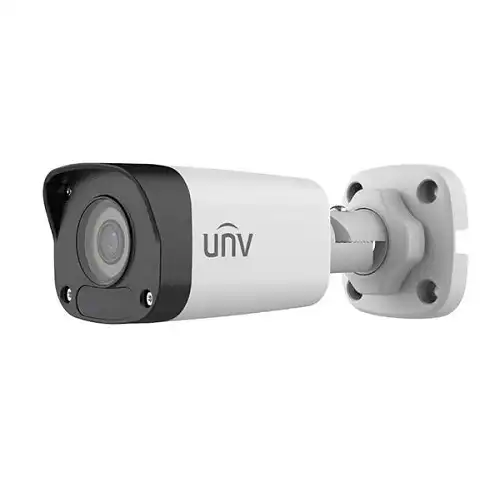
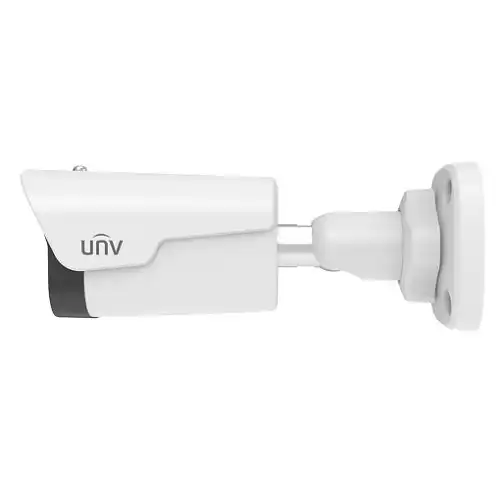
UNV IPC2122LB-SF40-A 2MP fixed bullet IP camera with 4mm lens, Smart IR up to 30m, Ultra 265 / H.265 / H.264, 12V DC or PoE and IP67 protection. Wired networking; built-in audio is not provided.
Share:
Nationwide Deliveryঢাকাসহ সারা বাংলাদেশ
Official Warrantyঅফিশিয়াল warranty support
Cash on Deliveryনিরাপদে অর্ডার করুন
Installation Supportদক্ষ technician service
CCTV installation প্রয়োজন?বাসা, অফিস ও প্রতিষ্ঠানের জন্য professional setup নিন।
No built-in microphone or speaker in manufacturer specification
Wireless
No Wi-Fi
Horizontal Field of View
82.5°
Official Model
IPC2122LB-SF40-A
Product Type
Mini Bullet Network Camera
Image Sensor
1/2.8-inch 2MP CMOS
Maximum Resolution
1920 × 1080
Lens
4mm fixed, F2.0; SF40-A variant
IR Distance
Up to 30m
Compression
Ultra 265 / H.265 / H.264
Network
RJ45 10/100 Mbps Ethernet
Power
12V DC or IEEE 802.3af PoE
Protection
IP67
Specifications are based on manufacturer information for the listed model and variant. Product details may change with hardware revision.
Description
UNV IPC2122LB-SF40-A 2MP IR bullet camera
UNV IPC2122LB-SF40-A is a compact fixed-lens network camera for a planned CCTV position. Its 4mm lens, 1080P video and infrared illumination suit an entrance, corridor, boundary or small commercial scene when the required detail and lighting have been checked.
No microphone, speaker or Wi-Fi in published specification
Select the correct UNV IPC2122LB-SF40-A lens and view
The SF40 model uses a 4mm fixed lens. It should be distinguished from the SF28 version listed in the same manufacturer’s table. A fixed focal length determines the view captured from a chosen position and should not be treated as a remote zoom function.
Choose mounting height and angle around the subject distance and the detail you need to see. An overview of a wide area may not identify a small face at the far end of the scene. Test a sample image from the intended position before completing the bracket and cable installation.
Plan usable infrared night images
Smart IR provides supplementary infrared illumination, with a published distance up to 30 metres under specified conditions. That figure does not guarantee face identification at the same distance. Review the night image at the actual scene, including reflective surfaces, nearby walls and objects that may dominate the illumination.
The infrared night image should not be confused with an always-colour night mode. Choose a different lighting or camera arrangement if colour detail in darkness is essential to the project. Keep the lens view clear of close obstructions and check both daytime exposure and night-time contrast during commissioning.
Provide wired networking and power
UNV IPC2122LB-SF40-A uses a wired RJ45 network connection. Plan suitable cable, connectors and a compatible network switch or recorder interface. Select either the specified DC supply or an appropriate IEEE 802.3af PoE source, and check the total PoE load if several cameras share one switch.
Protect outdoor cable joints using the correct weatherproofing method. The camera’s IP67 housing rating does not make an exposed power plug or poorly sealed network joint waterproof. Follow the mounting guide, secure the cable and keep the equipment within its documented operating environment.
Check the recorder and recording settings
Confirm UNV IPC2122LB-SF40-A compatibility with the selected NVR before a larger purchase. Check the supported video codec, resolution and frame rate, then test live view, recording and playback. ONVIF support can provide a compatible stream without guaranteeing every proprietary setting or event function on a different recorder.
Recording retention depends on bitrate, camera quantity, codec, frame rate and schedule. Select the recording profile and storage capacity together rather than predicting retention from the megapixel figure alone. Review exported footage as well as the live image to ensure the stored result meets the site’s needs.
Commission and maintain UNV IPC2122LB-SF40-A
Set an accurate timestamp, a useful camera name and the required recording schedule. Configure motion detection around the actual scene and check whether shadows, branches or passing traffic trigger unwanted events. Review the installation at different times of day before finalising notification rules.
Keep the full model and hardware information with the invoice for future support. Clean the viewing surface as needed and confirm that the camera’s aim has not moved after cable work or maintenance. Use the matching manufacturer documentation when reviewing firmware and settings.
Buy UNV IPC2122LB-SF40-A from Logic Gate Technology
Browse IP cameras or request CCTV installation support. Confirm current stock, price, local warranty, power accessories and the supplied lens before ordering.
Does this camera include recording storage?
Confirm the quoted package and recording design. A camera-only offer should not be assumed to include an NVR, HDD, PoE switch or installation work. This model’s published specification does not list built-in audio or Wi-Fi.




Reviews
There are no reviews yet.